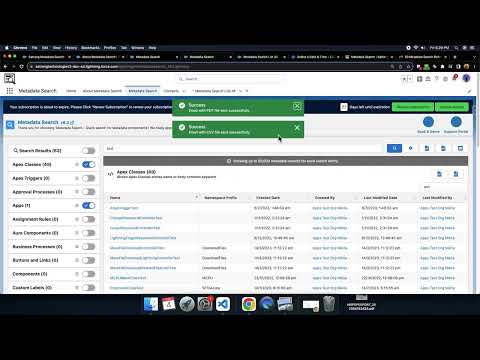
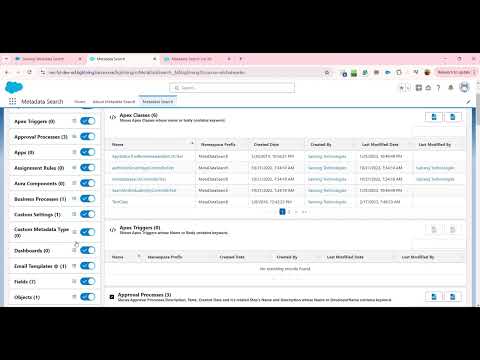
Instantly search Classes, Triggers, Objects, Fields, LWCs, Flows, Layouts, Profiles, Approvals and 30+ more Salesforce metadata components. Export results as PDF or CSV. Email the list to your team. No code required.
Trusted by Salesforce admins and developers at enterprises, nonprofits, and government teams worldwide.


Trusted by Salesforce admins and developers across 12 industries worldwide.
Metadata Search is 100% native and works seamlessly across every major Salesforce product and cloud.
Metadata Search is a 100% point-and-click Salesforce app. No developer needed. No SOQL. No code. Just type, search, and get instant results from your Salesforce org's metadata components.
Pick from 30+ metadata types: Apex Classes, Triggers, Objects, Fields, LWCs, Flows, Layouts, Profiles, Approvals, Reports, Dashboards, and more.
Enter a keyword or string. Results appear instantly as you type. Use the Search Options dialog for advanced filters and the Active Flow toggle for Lightning Experience.
Download your search results as PDF or CSV. Email the list directly to your team. Print a full component view. Use the List All add-on to get every record using that component.
Use as a Lightning Tab, add to your Utility Bar for quick access from any screen, or embed on the Home Page as a component.
Fully supported in Salesforce Classic too. Consistent, reliable search experience across both interfaces.
Add the Metadata Search component to any Salesforce record page for inline metadata lookup without leaving the record context.
Download as PDF or CSV, email the search list to a specific address, or print a full component table. Designed for team collaboration and audit documentation.
The only 100% native Salesforce app that lets you search across 30+ metadata component types, discover dependencies, and export or email results instantly. No scripts, no SOQL, no code.
Search across all major Salesforce metadata components in real time. Results appear as you type, with no waiting and no page reloads.
Classes, Triggers, Objects, Fields, LWCs, Approvals, Layouts, Flows, Workflows, Validations, Reports, Dashboards, Apps, Roles, Profiles, Groups, Queues, Sites, Record Types, Buttons, Links, and more.
Export your search results as a PDF or CSV file in one click. Perfect for documentation, audits, and sharing with your team.
Email the searched list of components directly to any email address, including as PDF or CSV attachment. Built for collaboration.
Available as a Lightning Tab, Utility Bar component, Home Page component, and Record Page component. Works wherever you need it.
Advanced search options dialog lets you refine your results. Active Flow toggle in Lightning Experience lets you filter active flows specifically.
Print a full view of all components that can be searched. Great for org documentation, onboarding, and training materials.
App UI available in 16 languages. Trusted by Salesforce teams across 100+ countries for global org management.
AppExchange certified. Your data never leaves Salesforce. Fully respects your org's permission model and sharing rules.
Understand where a field, class, or component is used across your org. Prevent breaking changes with confidence before making updates.
Quickly identify technical debt, unused components, and dependencies. An essential tool for org migrations, merges, and cleanups.
Search metadata inside managed packages to understand how installed apps interact with your custom configurations.
Click any screenshot to open a fullscreen viewer with keyboard navigation.


Tutorial videos on YouTube covering the full app from quick start to the List All add-on feature and pricing.
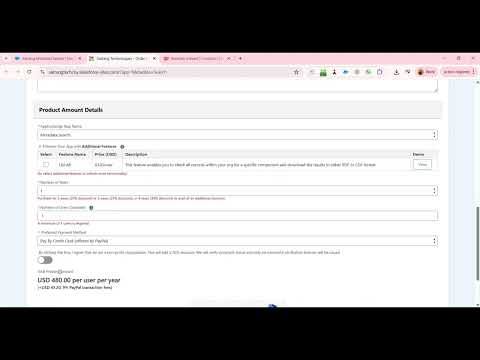
No complex calculations. Purchase a base license for your team, add the optional List All add-on, and top up users any time. ACH, Wire, and Credit Card accepted.
Unlock even more power with the List All add-on, priced separately on top of your base license.
Check all records within your org that use a specific component and download the complete results in PDF or CSV format. Perfect for impact analysis, audits, and documentation.
How to order: Visit the order form and select Metadata Search as the app name along with the number of users and license years. For additional licenses or the List All add-on, contact us directly. Full pricing details are also available via the pricing video.
All reviews verified on Salesforce AppExchange. Click any card to read it on AppExchange.
This app is one of the best in our org! It saves us a lot of time of having to search where metadata (fields/email templates/etc.) are used, also eliminating the possibility of human error of missing something and causing problems in our configuration. The customer support is also fast and efficient! Keep up the good work!
UI is intuitive. Search is as fast as can be hoped for. Filters are robust. This product is a no-code solution for tracing dependencies within Salesforce. An excellent utility for any Salesforce admin or developer who needs to understand their org's configurations.
I use this tool to help determine the impact of making configuration changes and deleting technical debt. It is working well. Excellent for quickly finding where fields and components are referenced across the entire org before making updates.
This app is just what we needed for training sessions and onboarding where we could show all the code related to a feature at once. Very helpful during migration to check where metadata is referenced and makes our life a lot easier. Thanks team Satrang. Strongly recommend!
I absolutely like this app! Best thing about it is it saves lots of time for searching where all a particular field is used. This tool helped me find important things like Triggers, Objects, Validation Rules etc. in a much faster way. It searches through almost all metadata. Simply amazing!
This tool is the best thing anyone can have in their org. It saves hours of research time trying to find where all a particular field is used, etc. Excellent tool - have used it for years in 2 different orgs. Excellent customer service.
Browse our full knowledge base for every documented FAQ or book a call and we will walk you through everything.
Browse All FAQsMetadata search guides, best practices, and Salesforce org management tips from the Satrang team.
We are publishing metadata search guides, how-tos, and Salesforce admin best practices. Once articles are published and tagged to this product, they will appear here automatically.
Fill in the form and we will reply within one business day with a personalized demo tailored to your metadata search use case.
We build native, no-code Salesforce tools loved by admins and teams worldwide. Hover any app to learn more.