What exactly does My Opportunities show on the Account page? +
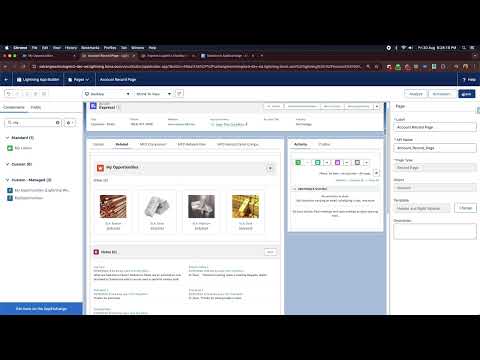
My Opportunities shows all Opportunity Products related to the Account you are currently viewing. These are the products attached to Opportunities linked to that Account. They appear in a visual wardrobe-style card layout, grouped by Product Family or Unit of Measure depending on your filter selection.
How do I add it to the Account Record Page? +
After installing from AppExchange, open Lightning App Builder for the Account object. Find the My Opportunities component in the component list on the left panel. Drag it onto the page layout as a tab. Save and activate. The component will then appear as a tab on every Account record page for users who have access.
What filter options are available? +
The Apply Filters dialog gives you four options: Stage (filter by Opportunity Stage value such as Prospecting, Closed Won, etc.), Time Frame (This Year or Last Year), Sort By (Latest or Chronological), and Group By (Product Family or Quantity Unit of Measure). Set any combination and click OK to instantly refresh the view.
What is the difference between the two Group By modes? +
Group By Product Family organizes opportunity product cards by the Product Family field on the product record. Group By Quantity Unit of Measure groups them by the unit of measure defined on the opportunity product line item. Both give you a different lens into the same data, letting you analyze pipeline by product category or by unit type.
Is this app free? Are there any limits? +
Yes, My Opportunities is completely free. There is no license cost, no subscription tier, no usage cap, and no credit card required. Install it from AppExchange and all features are available to all users in your org immediately.
Which Salesforce editions does it support? +
My Opportunities is a 100% native Salesforce Lightning Web Component. It works on all major editions including Professional, Enterprise, Unlimited, and Developer. It requires Lightning Experience as it is an LWC component.
Where can I find the user guide or documentation? +
The full user guide is available on the Satrang Technologies Freshdesk support portal. You can also find release notes and FAQ articles there. Links to all documentation are in the Resources section of this page.